We have compiled a list of manufacturers, distributors, product information, reference prices, and rankings for Design support software.
ipros is IPROS GMS IPROS One of the largest technical database sites in Japan that collects information on.

Design support software Product List and Ranking from 44 Manufacturers, Suppliers and Companies | IPROS GMS

Last Updated: Aggregation Period:Jan 14, 2026~Feb 10, 2026
This ranking is based on the number of page views on our site.

Design support software Manufacturer, Suppliers and Company Rankings

Last Updated: Aggregation Period:Jan 14, 2026~Feb 10, 2026
This ranking is based on the number of page views on our site.

  1. システムクリエイト Osaka//Industrial Machinery
  2. アクアソフト Okayama//software
  3. null/null
  4. 4 日本ケイデンス・デザイン・システムズ社 Kanagawa//software
  5. 4 ニューコム Saitama//software

Design support software Product ranking

Last Updated: Aggregation Period:Jan 14, 2026~Feb 10, 2026
This ranking is based on the number of page views on our site.

  1. New Introduction Campaign "EZ Jig for Rhino" システムクリエイト
  2. [Case Study of Electric Craftsman NX] Compared products from three companies and decided on ANDES Electric Craftsman. アクアソフト
  3. Parts Configuration Management System "Production Innovation Bom-jin"
  4. 4 Electric Control Symbol Data Collection - e-Parts CAD Symbol Data ニューコム
  5. 5 SOLIDWORKS Useful Features Part 6: Width Match/Distance Limit Match アルゴジャパン・イーエス

Design support software Product List

1~30 item / All 125 items

Displayed results

Z-planner Enterprise

Enhancing the stack-up design process of printed circuit boards with high-precision field solvers, loss planning environments, and a complete library of dielectric materials.

The issue of stack-up is one of the main causes of board respins that everyone wants to avoid. Among the many stack-up tools available, only Z-planner Enterprise can enhance the stack-up design process with high-precision field solvers, loss planning environments, and a complete library of dielectric materials, all of which interface seamlessly with widely used signal integrity software. As edge rates become increasingly faster, accurate calculations of loss and impedance using real dielectric material data are essential for correctly designing the stack-up from the outset. 【Features】 • Integration of HyperLynx field solver • Unlimited number of layers and impedance groups • Advanced stack-up wizard • Compare stack-ups from various fabs against specifications and ensure DFX rules are applied • Consideration of glass properties to mitigate shifts caused by glass weaving • Import stack-ups from the manufacturing department with detailed manufacturing properties added *For more details, please download the PDF or contact us.

  • Printed Circuit Board
  • Design support software

Added to bookmarks

Bookmarks list

Bookmark has been removed

Bookmarks list

You can't add any more bookmarks

By registering as a member, you can increase the number of bookmarks you can save and organize them with labels.

Free membership registration

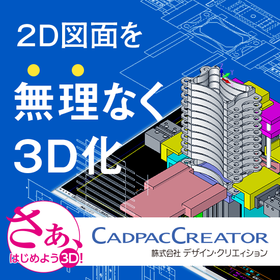
Realizing 'effortless 3D conversion' by leveraging the strengths of each aspect of 2D and 3D CAD.

Create a 3D model from the conceptual diagram of 2DCAD. Editing and modifications can be intuitively operated with direct modeling using 'CADPAC-CREATOR'.

"Can we smoothly transition from 2D design to 3D design? What changes will occur once we incorporate 3D design?" There may be 2D CAD designers who are pondering these questions. With CADPAC-CREATOR, instead of jumping straight into 3D design, we first create the necessary 3D models using 2D conceptual drawings, and then we conduct detailed design within the 3D environment. CADPAC-CREATOR enables a "natural transition to 3D" that leverages the strengths of both 2D and 3D. ▼Benefits of Introducing CADPAC-CREATOR▼ - Intuitive 3D modeling with a 2D mindset - Prevention of simple mistakes that occurred in 2D - What is difficult in 2D becomes easy in 3D - Effective use of both 2D and 3D to improve design quality

  • iprosメルマガ2311_02.png
  • iprosメルマガ2311_03.png
  • 3D CAD
  • 2D CAD machine
  • Other CAD
  • Design support software

Added to bookmarks

Bookmarks list

Bookmark has been removed

Bookmarks list

You can't add any more bookmarks

By registering as a member, you can increase the number of bookmarks you can save and organize them with labels.

Free membership registration

Material Design AI Platform Citrine Platform

Promoting Materials Informatics (MI) to achieve accelerated materials development.

The Citrine Platform is a materials informatics solution that combines smart data structure management with artificial intelligence (AI) specialized in the materials and chemicals field to accelerate product development and lead companies' R&D strategies to success. Through a sequential learning approach that aims for optimal solutions by iteratively improving predictions from AI models and actual experiments, it is possible to achieve target material properties with approximately 50-70% fewer experiments compared to traditional research and development methods.

  • Other analyses
  • Design support software

Added to bookmarks

Bookmarks list

Bookmark has been removed

Bookmarks list

You can't add any more bookmarks

By registering as a member, you can increase the number of bookmarks you can save and organize them with labels.

Free membership registration

Thermal Design Process Navigator Thermocalc

With thermal design and thermal analysis working in tandem, we aim for product design without rework.

Thermocalc is a thermal design process navigator that can be utilized in the very early stages of the electronic device design flow, allowing for temperature predictions of devices and components, identification of thermally hazardous parts, and consideration of thermal countermeasures before the specific design phase. By using it prior to verification through thermal fluid analysis, subsequent thermal design can be carried out efficiently. Instead of performing large-scale numerical analysis by modeling shapes, Thermocalc conducts thermal calculations based on dedicated thermal calculation formulas rooted in basic heat transfer equations. It features manual input for external dimensions, shapes, power consumption of enclosures and components, as well as 37 types of thermal calculation sheets tuned for each design target, and a rich library of approximately 280 types of fan and material properties, allowing for immediate application in thermal design after implementation. Additionally, it has a high degree of compatibility with advanced thermal fluid analysis tools, enabling the import of electronic component databases, the import of bill of materials from schematic CAD, and data output to specialized thermal design support tools like FloTHERM and FloTHERM PCB for circuit and PCB designers.

  • Company:IDAJ
  • Price:Other
  • simulator
  • Thermo-fluid analysis
  • Other analyses
  • Design support software

Added to bookmarks

Bookmarks list

Bookmark has been removed

Bookmarks list

You can't add any more bookmarks

By registering as a member, you can increase the number of bookmarks you can save and organize them with labels.

Free membership registration

NDB_PCB LightViewer Option Implementation Density Calculation Function

NDB_PCB LightViewer Option Implementation Density Calculation Function

The purpose of effectively utilizing this feature varies for our customers. It is mainly used as a reference information during revisions (changes) in printed circuit board design.

  • Other CAD
  • Other electronic parts
  • Other contract services
  • Design support software

Added to bookmarks

Bookmarks list

Bookmark has been removed

Bookmarks list

You can't add any more bookmarks

By registering as a member, you can increase the number of bookmarks you can save and organize them with labels.

Free membership registration

Malsugo: Intuitive Fixture Design EZ Jig for Rhino

Intuitively design jigs! "EZ Jig for Rhino," a plugin software for "Rhinoceros."

Marsugo is a document that picks up the functions and features of various products and introduces the "amazing" aspects of them. Jigs have various applications, such as processing and assembly of products. However, designing them requires specialized knowledge and experience, which can take time and effort. Have you ever thought, "I wish I could design them more easily..."? The "EZ Jig for Rhino" that we are introducing this time solves that problem! The "EZ Jig for Rhino" is characterized by its interactive modeling capabilities. This allows even those without CAD experience to easily design jigs. Since jig data can be created easily and intuitively, it can lead to immediate jig creation on-site, such as making 3D printed jigs! The document provides a detailed explanation of the steps to complete the jig design with model data, so please take a look. *You can download the document using the button below.

  • Assembly Jig
  • Processing Jig
  • jig
  • Design support software

Added to bookmarks

Bookmarks list

Bookmark has been removed

Bookmarks list

You can't add any more bookmarks

By registering as a member, you can increase the number of bookmarks you can save and organize them with labels.

Free membership registration

[Case Study] Fujikiko Manufacturing Co., Ltd.

Transforming designers into the creators they are meant to be! Reasons for choosing to implement E3.series.

Fuji Machine Manufacturing Co., Ltd., which develops robots to implement electronic components on printed circuit boards in smartphones and computers, has introduced our "E3.series." Before the introduction, there were challenges such as creating circuit diagrams and harness diagrams separately, which took a significant amount of time. With the introduction of "E3.series," we expect to achieve benefits such as shortening lead times by advancing the ordering of materials through early output of the parts list. [Challenges Before Introduction] ■ Circuit diagrams and harness diagrams were created separately, taking a considerable amount of time. ■ Manual checks of circuit diagrams and harness diagrams led to oversight and mistakes. ■ Issues arose when only some drawings were modified during design changes, resulting in other drawings being reused without reflecting the changes. *For more details, please refer to the PDF materials or feel free to contact us.

  • Other CAD
  • Design support software

Added to bookmarks

Bookmarks list

Bookmark has been removed

Bookmarks list

You can't add any more bookmarks

By registering as a member, you can increase the number of bookmarks you can save and organize them with labels.

Free membership registration

[Case Study] Reiden Co., Ltd.

The design period is reduced by about half! The accuracy of estimates and the quality of design have significantly improved.

We have introduced our "Harness Designer Manufacturer Edition" to Reiden Co., Ltd., a supplier of wire harnesses for construction machinery. Before the introduction, there were challenges such as the inability to quickly provide accurate estimates during busy periods. After the introduction, we were able to automatically output full-size diagrams for harness assembly instructions during manufacturing preparation, leading to a reduction in manufacturing lead time. 【Challenges Before Introduction】 ■ Interpreting paper drawings, verifying hundreds of connectors and wires, and selecting nearly a thousand terminals ■ Relying on the time and effort of skilled designers to maintain product quality ■ Inability to quickly provide accurate estimates during busy periods *For more details, please refer to the PDF document or feel free to contact us.

  • Other CAD
  • Design support software

Added to bookmarks

Bookmarks list

Bookmark has been removed

Bookmarks list

You can't add any more bookmarks

By registering as a member, you can increase the number of bookmarks you can save and organize them with labels.

Free membership registration

[Overseas Case Study] Müller Martini Company

Manage variations and options to reduce manufacturing costs!

Müller Martini, a company that provides a wide range of products to printing companies around the world in fields such as binding machinery, printing machinery, and newspaper distribution systems, has implemented our "E3.series." Before the implementation, there were challenges such as a lack of information sharing among design, manufacturing, and procurement. After the introduction of "E3.series," benefits were realized, such as cost reduction by utilizing data to drill holes in the enclosures. [Challenges Before Implementation] - Each department was individually marking correction instructions on the drawings, which took time and effort to consolidate. - There was no information sharing among design, manufacturing, and procurement. - Issues such as interference between cables and enclosures occurred on the production floor, leading to rework. *For more details, please refer to the PDF document or feel free to contact us.*

  • Other CAD
  • Design support software

Added to bookmarks

Bookmarks list

Bookmark has been removed

Bookmarks list

You can't add any more bookmarks

By registering as a member, you can increase the number of bookmarks you can save and organize them with labels.

Free membership registration

[Case Study] Nichicon Corporation Power Supply Center

Hundreds of thousands of check items completed in a single day! Dramatically improving the efficiency of insulation distance verification.

Nichicon Corporation's Power Supply Center, which is engaged in the planning, design, and quality assurance of energy storage systems and general power supplies (switching power supplies), has introduced our electromechanical verification tool "XVL Studio Z." Before the introduction, there were challenges such as difficulty in measuring insulation distances due to areas that were not visible in prototype devices or where test fingers could not reach. With the introduction of "XVL Studio Z," it became easy to identify areas where spatial and creepage distances were insufficient, and all areas requiring verification were checked, eliminating any oversights in the verification process. [Challenges Before Introduction] ■ During the prototype stage, there were instances where insulation distances were insufficient inside the enclosure, but it was difficult to locate the occurrence. ■ Due to areas that were not visible in the prototype or where test fingers could not reach, measuring insulation distances was challenging. ■ With increased multifunctionality, the verification workload for safety standards during the design phase was on the rise. *For more details, please refer to the PDF document or feel free to contact us.

  • 3D CAD
  • Other CAD
  • Design support software

Added to bookmarks

Bookmarks list

Bookmark has been removed

Bookmarks list

You can't add any more bookmarks

By registering as a member, you can increase the number of bookmarks you can save and organize them with labels.

Free membership registration

[Industrial Equipment Industry] Electrical Control and Electrical Design System 'E3.series'

An integrated electrical CAD that supports the advanced and complex design of electrical control and cable connections. Significantly reduces inefficient work hours! *Case studies available.

E3.series is an integrated electrical CAD that supports electrical control, electrical equipment, and cable and harness design. To manage the design data of one product in a single file, it allows for the sharing of component information and connection/signal information across all design drawings. [Common Current Situation of Customers Whose Electrical Design Area Has Become Drawing Operations] ■ Due to the lack of linkage between the panel layout and circuit diagrams, there are occurrences of missing component placements and changes. ■ Creating harness diagrams takes an excessive amount of time. ■ Bill of materials and terminal connection tables are created manually, leading to frequent transcription errors and rework. [Examples of Implementation Effects for Customers Who Have Introduced E3.Series] ■ Consistency between drawings is maintained, significantly reducing missing component placements and changes. ■ Cable diagrams can now be semi-automatically generated from circuit diagrams, improving work efficiency. ■ The creation of bill of materials and terminal connection tables has been automated, eliminating errors. *For more details, please refer to the PDF document or feel free to contact us.

  • Other food machinery
  • Other CAD
  • Design support software

Added to bookmarks

Bookmarks list

Bookmark has been removed

Bookmarks list

You can't add any more bookmarks

By registering as a member, you can increase the number of bookmarks you can save and organize them with labels.

Free membership registration

Handbook of Analytical Theory Useful for Press Die Design - Currently Available as a Gift

Case studies of using press molding simulation with 3DSimSTAMP are published!

This handbook is designed to be easy to understand for beginners in press simulation, covering fundamental content. It includes examples of phenomena not addressed by other companies' molding simulations, such as applications to bending processes and considerations of press loads, starting with press forming CAE, commonly known as molding simulation. Please take a look at the features of press forming simulation using 3DSimSTAMP. 【Contents】 - Useful for mold designers! The application fields of press forming CAE explained through analytical theory - Load considerations and applications of press forming CAE using 3DSimSTAMP - Press die design utilizing simulation For more details, please contact us or download the catalog. *This catalog is a digest version. If you need the full version, please apply through the inquiry form.

  • Press Dies
  • Mold Design
  • Design support software

Added to bookmarks

Bookmarks list

Bookmark has been removed

Bookmarks list

You can't add any more bookmarks

By registering as a member, you can increase the number of bookmarks you can save and organize them with labels.

Free membership registration

Solution "Trans Design"

This solution enables the visualization of complex physical phenomena!

"Transformer Design" is a solution that considers complex phenomena such as miniaturization and low-profile design for transformers and reactors, allowing for efficient design work. By predicting the efficiency of design requirements and leakage inductance in advance, it reduces the number of prototypes, visualizes complex physical phenomena such as current distribution within windings and spatial leakage magnetic flux, and achieves improved operational efficiency by conducting design and evaluation within a single system. It is also equipped with functions to analyze winding losses due to skin and proximity effects, as well as temperature evaluations based on heat sources, and to analyze vibrations and noise. 【Features】 ■ Contributes to reducing the number of prototypes ■ Enables advance prediction of inductance ■ Achieves improved operational efficiency *For more details, please refer to the catalog or feel free to contact us.

  • Other plant design, development and maintenance
  • Other analysis software
  • Design support software

Added to bookmarks

Bookmarks list

Bookmark has been removed

Bookmarks list

You can't add any more bookmarks

By registering as a member, you can increase the number of bookmarks you can save and organize them with labels.

Free membership registration

UC-1 for SaaS FRAME within/RC section

In-plane analysis program for arbitrary shape plane frameworks.

The reinforced concrete cross-section verification program "RC Cross-Section Calculation" and the arbitrary shape frame analysis program "FRAME (In-Plane)" will be newly supported as web server applications and provided as part of the C-1 for SaaS family of products.

  • Other analyses
  • Design support software

Added to bookmarks

Bookmarks list

Bookmark has been removed

Bookmarks list

You can't add any more bookmarks

By registering as a member, you can increase the number of bookmarks you can save and organize them with labels.

Free membership registration

TrochoidV6/V6C

Trochoidal Gear Design and Manufacturing Support Software

This is software that supports the design and production of planetary differential gear systems using trochoid gears. We are pleased to announce the upgrade of "TrochoidV5/V5C" and the new release of "TrochoidV6/V6C." In this upgrade, we have implemented processing for the outer diameter of large trochoid gears with a high number of differential teeth, allowing them to be displayed as a single gear. Additionally, we have added the ability to select between eccentric rotation and axial rotation reduction mechanisms, as well as a text-saving function for design data, significantly enhancing the support for production. Furthermore, "TrochoidV5/V5C" will continue to be available for sale.

  • 3D CAD
  • Design support software

Added to bookmarks

Bookmarks list

Bookmark has been removed

Bookmarks list

You can't add any more bookmarks

By registering as a member, you can increase the number of bookmarks you can save and organize them with labels.

Free membership registration

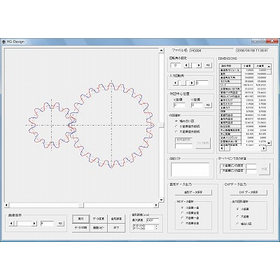
Planetary Gear Design and Manufacturing Support Software PL_Design

Software for the design and manufacturing support of planetary gears

PL_Design" is software that supports the design and manufacturing of planetary gear reduction mechanisms. By simply inputting basic gear data, you can design a planetary gear mechanism. The design form allows for easy operations such as rotation simulations of planetary, solar, and star-type mechanisms, creation of tooth profile diagrams using racks, output of DXF files, and text saving of tooth profile data. This time, "PL_Design" has been upgraded with added functionality to support the design of "lateral displacement.

  • gear
  • Drive system parts
  • Other industrial robots
  • Design support software

Added to bookmarks

Bookmarks list

Bookmark has been removed

Bookmarks list

You can't add any more bookmarks

By registering as a member, you can increase the number of bookmarks you can save and organize them with labels.

Free membership registration

The displacement is the design and manufacturing support software for the swivel car HG_Design.

Displacement is a software for design and manufacturing support of roller vehicles.

We support the design and manufacturing of spur gears and helical gears. With simple operations, you can quickly perform displacement design and meshing simulations for spur gears and helical gears, create tooth profiles, generate DXF files, save tooth profile data coordinates, and conduct strength calculations according to JGMA standards.

  • gear
  • Other machine tools
  • Transmission parts
  • Design support software

Added to bookmarks

Bookmarks list

Bookmark has been removed

Bookmarks list

You can't add any more bookmarks

By registering as a member, you can increase the number of bookmarks you can save and organize them with labels.

Free membership registration

Vectorworks Architect 2026

Standalone version lease monthly fee: 7,400 yen (excluding tax)

Basic package + Specialized functions for architecture A product for the architecture, interior design, and interior industry equipped with design support functions for the architectural field. Introduction to Vectorworks 2026 Standalone Version Usage Type Can be differentiated by environment One license can be installed on two machines. Designers can differentiate usage based on the environment, such as using a desktop in the office and a machine for outings. *Only one machine can operate simultaneously. No license authentication or procedures required Startup uses internet authentication. After the initial authentication, it can be used for 90 days without being connected to the network. *After the initial authentication, if started in an environment connected to the network, authentication will be performed automatically.

  • 3D CAD
  • Design support software

Added to bookmarks

Bookmarks list

Bookmark has been removed

Bookmarks list

You can't add any more bookmarks

By registering as a member, you can increase the number of bookmarks you can save and organize them with labels.

Free membership registration

Inspector

Easily obtain the coordinates of the small segment's endpoints with the arbitrary section function! Perfect for checking CALS delivery drawings!

The "Inspector" can easily calculate the 3D coordinates of any point on a cross-section diagram, significantly reducing mistakes during construction, such as those related to setting out, without bringing cumbersome tasks to the site. 【Main Features】 ■ Checking CALS delivery drawings (cross-section diagrams, floor plans)… ■ Coordinate transformation of management cross-sections (cross-section diagrams) to the World Geodetic System ■ Coordinate calculation from cross-sections of arbitrary measurement points not shown in the drawings ■ 3D coordinate output to EXCEL and SIMA > to total stations… ■ Support for setting out ■ Assistance in creating as-built management drawings *For more details, please refer to the PDF materials or feel free to contact us.

  • Software (middle, driver, security, etc.)
  • Design support software

Added to bookmarks

Bookmarks list

Bookmark has been removed

Bookmarks list

You can't add any more bookmarks

By registering as a member, you can increase the number of bookmarks you can save and organize them with labels.

Free membership registration

AutoForm NEWS No.22

A community magazine connecting auto forms and users.

"AutoForm NEWS," a quarterly publication delivering information about AutoForm to existing users.

  • Other analyses
  • Design support software

Added to bookmarks

Bookmarks list

Bookmark has been removed

Bookmarks list

You can't add any more bookmarks

By registering as a member, you can increase the number of bookmarks you can save and organize them with labels.

Free membership registration

AutoForm NEWS No.24

A community magazine connecting auto forms and users.

"AutoForm NEWS," a quarterly publication delivering information about AutoForm to existing users.

  • Other analyses
  • Design support software

Added to bookmarks

Bookmarks list

Bookmark has been removed

Bookmarks list

You can't add any more bookmarks

By registering as a member, you can increase the number of bookmarks you can save and organize them with labels.

Free membership registration

AutoForm NEWS No.25

Community magazine connecting auto forms and users

"AutoForm NEWS," a quarterly publication delivering information about AutoForm to existing users.

  • Press Dies
  • Mold Design
  • Design support software

Added to bookmarks

Bookmarks list

Bookmark has been removed

Bookmarks list

You can't add any more bookmarks

By registering as a member, you can increase the number of bookmarks you can save and organize them with labels.

Free membership registration

AutoForm NEWS No.26

A community magazine that connects auto forms and users.

"AutoForm NEWS," a quarterly publication delivering AutoForm information to existing users.

  • Other CAD related software
  • Other CAM related software
  • Analysis Services
  • Design support software

Added to bookmarks

Bookmarks list

Bookmark has been removed

Bookmarks list

You can't add any more bookmarks

By registering as a member, you can increase the number of bookmarks you can save and organize them with labels.

Free membership registration

Proposing ways to utilize AutoForm for short lead times and high-quality mold making.

In AutoForm-Sigma^plus, effective countermeasures against defects can be implemented.

In AutoForm-Sigma^plus, it is possible to consider countermeasures for defects "analytically" and clarify the process windows that can be processed, allowing for the implementation of effective countermeasures against defects.

  • Other CAD related software
  • Analysis Services
  • Design support software

Added to bookmarks

Bookmarks list

Bookmark has been removed

Bookmarks list

You can't add any more bookmarks

By registering as a member, you can increase the number of bookmarks you can save and organize them with labels.

Free membership registration

AutoForm NEWS No.27

A community magazine connecting auto forms and users.

"AutoForm NEWS," a quarterly publication delivering information about AutoForm to our users.

  • Analysis Services
  • Other analyses
  • Design support software

Added to bookmarks

Bookmarks list

Bookmark has been removed

Bookmarks list

You can't add any more bookmarks

By registering as a member, you can increase the number of bookmarks you can save and organize them with labels.

Free membership registration

Improvement methods for defects using AutoForm

Introduction to the examination of solutions for warping, wrinkles, and surface distortion using AutoForm, as well as methods for minimizing springback.

This introduction discusses the collaboration between AutoForm-Explorer and AutoForm-Sigma as a method for examining and resolving surface strain during die face design. By utilizing the AutoForm-Sigma feature, which is standard in AutoForm-Explorer, it is possible to consider solutions not only for surface strain but also for issues such as cracks and wrinkles, as well as to minimize springback.

  • Other CAM related software
  • Other CAD related software
  • Other analyses
  • Design support software

Added to bookmarks

Bookmarks list

Bookmark has been removed

Bookmarks list

You can't add any more bookmarks

By registering as a member, you can increase the number of bookmarks you can save and organize them with labels.

Free membership registration